Liebe JBoss OneDayTalk-Interessierte,
endlich ist es soweit und wir sind seit gestern mit dem Programm der JBoss OneDayTalk 2011 Konferenz online gegangen. Die Konferenz findet dieses Jahr am 13. Oktober 2011 in München statt. Und die Online-Registrierung ist jetzt geöffnet mit einer regulären Teilnahmegebühr von 89, - EUR. Sichern Sie sich jetzt bis zum 30.06.2011 ein Early Bird von 10%.
Es wird diesmal drei Tracks, 18 Vorträge und 20 Speakers geben. Das Programm und bereits bestätigten Talks finden Sie unter http://onedaytalk.org/index.php/program.
Unter den Speakerns sind unter anderem Adam Bien, Gavin King, Stefan Tilkov, Michael Plöd, Jan Wildeboer, Heiko Braun, Heiko Rupp, Werner Eberling, Volker Bergmann und Kris Verlaenen. Alle Speaker finden Sie unter http://onedaytalk.org/index.php/speakers.
Wir freuen uns über Ihre Teilnahme und für weitere Information besuchen Sie unsere Web Seite http://onedaytalk.org.
Viele Grüße vom JBUGM Team
http://www.jbug-munich.org
Tuesday, June 21, 2011

Tuesday, June 14, 2011
AS7 Console performance improvements
I did take a look at the components that serve the console files again and removed some really sloppy parts and tweaked the HTTP cache behavior a little bit. With some really interesting results.
This is what the average page loading time looked like, when client did access the console for the first time:

This is what looks like after the improvements:

It get's even better, when a client does access the console subsequently:

How can it be explained?
Well the most notable improvement is probably the replacement of the sloppy IO parts. Hence the drastic page loading times from ~4sec to ~1sec. Furthermore the addition of an HTTP "Expires" header allows the browser to successfully cache the results, which drastically decreases the page loading size from ~750kb ~10kb. All tests have been run on a LAN connection.
Thursday, May 26, 2011
Managing JBoss7: Console Beta9 released
We just updated to 1.0.0.Beta9:
===================
- suport for standalone
- i18n
- deployments
- authentication
- datasources
- jms configurations
- messaging
- web subsystem
- server groups
- server configurations
- system properties
- jvm options
- socket bindings
The given functionality has small glitches here and there but most of it has been reported and is being worked on. In terms real tasks, this is still outstanding:
- transaction subsystem
- security
- webservices
- threads
- logging
But we expect this to be ready for 7.0.CR1.
Give it try & let us know what you think.
Tell us what works and what doesn't.
How do I access the console?
==================
http://localhost:9990/console
How do I enable authentication?
====================
Simply create a security realm configuration.
This needs to be done in "domain/configuration/host.xml" for domain mode:
Or "standalone/configuration/standalone.xml":
How do I switch between standalone and domain administration?
========================================
Just boot AS7 in either one of these modes and reload the console web application.
===================
- suport for standalone
- i18n
- deployments
- authentication
- datasources
- jms configurations
- messaging
- web subsystem
- server groups
- server configurations
- system properties
- jvm options
- socket bindings
The given functionality has small glitches here and there but most of it has been reported and is being worked on. In terms real tasks, this is still outstanding:
- transaction subsystem
- security
- webservices
- threads
- logging
But we expect this to be ready for 7.0.CR1.
Give it try & let us know what you think.
Tell us what works and what doesn't.
How do I access the console?
==================
http://localhost:9990/console
How do I enable authentication?
====================
Simply create a security realm configuration.
This needs to be done in "domain/configuration/host.xml" for domain mode:
<management>
       <security-realms>
           <security-realm name="ManagementRealm">
               <authentication>
                   <users>
                       <user username="admin">
                           <password>
                               password
                           </password>
                       </user>
                   </users>
               </authentication>
           </security-realm>
       </security-realms>
   </management>
   <management-interfaces>
       <native-interface interface="public" port="9999"/>
       <http-interface interface="public"
            port="9990" security-realm="ManagementRealm"/>
   </management-interfaces>
Or "standalone/configuration/standalone.xml":
<management>
       <security-realms>
           <security-realm name="ManagementRealm">
               <authentication>
                   <users>
                       <user username="admin">
                           <password>password</password>
                       </user>
                   </users>
               </authentication>
           </security-realm>
       </security-realms>
   </management>

   <management-interfaces>
      <native-interface interface="default" port="9999"/>
      <http-interface interface="default"
              port="9990" security-realm="ManagementRealm"/>
   </management-interfaces>
How do I switch between standalone and domain administration?
========================================
Just boot AS7 in either one of these modes and reload the console web application.
Wednesday, May 11, 2011
WebKit Remote Debugging
Interesting, remotely connect the web inspector to a web kit instance:
http://www.webkit.org/blog/1620/webkit-remote-debugging/
http://www.webkit.org/blog/1620/webkit-remote-debugging/
Tuesday, May 10, 2011
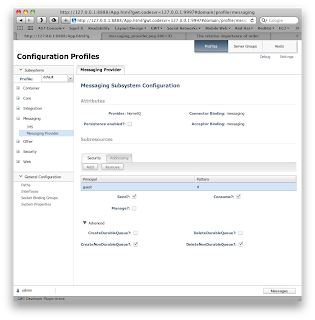
Managing JBoss7: Messaging Provider Settings
This should give you an idea how the HornetQ configuration is going to look like:
Messaging Provider
Queues & Topics

Messaging Provider

Queues & Topics

Friday, May 6, 2011
Managing JBoss7: Datasource Configurations
We've begun working on datasource configurations within the web management interface. While it still requires some finishing touches, here's how regular and XA datasource configurations look like:


Thursday, April 14, 2011
Managing JBoss7: Staging Applications
Your colleagues are all stressed out, because the new build of your b2b app needs to be put on a staging server for your external partner to verify the recent API changes. How to get this setup and running without interfering with the existing production system? It's fairly simple. I'll show you ...

A custom server-group separates our staging environment from the production servers.

You need to remember this, in order to connect to the server instances later on.

So we can connect to it.

In this case a simple web application.

Domain deployments are always associated with server-groups.


Fairly simple, no?
Step1: Create a dedicated server group for your staging servers

Step2: Prepare a staging server-configuration
A custom server-group separates our staging environment from the production servers.

... with a specific port offset
You need to remember this, in order to connect to the server instances later on.

Launch a server instance
So we can connect to it.

Deploy your application
In this case a simple web application.

... to the staging server-group
Domain deployments are always associated with server-groups.


Verify it has been deployed successfully

Grab a coffee and relax
Fairly simple, no?
Subscribe to:
Posts (Atom)